
 Photoshop
 Maya
 Houdini
 Unreal Engine
 Substance Painter
 Blender
 Nuke
 Arnold
 KeyShot
 V-Ray
 Substance Designer
 Mari
 Marmoset Toolbag
 3ds Max
 3DCoat
 Redshift
 After Effects
 Faceform Wrap
 Lightroom
 OctaneRender
 SpeedTree
 Daz 3D
 Agisoft Metashape
 Fusion
 Modo
 RealityCapture
 Gaea
 Cinema 4D
 Gravity Sketch
 Premiere
 Procreate
 Substance 3D Modeler
 SketchUp
 SketchBook
 Quixel DDO
 Katana
 Krita
 Natron
 Quixel Bridge
 Quixel Megascans
 Quixel Mixer
 Mudbox
 World Creator
 Yeti
 Ziva VFX
 Mixamo
 Adobe Medium
 SynthEyes
 Clip Studio Paint
 Unity
 Gaffer
 xNormal
 TreeIt
 Meshmixer
 Massive
 Materialize
 DaVinci Resolve
 Ornatrix
 PreForm
 Corel Painter
 Moi 3D
 QuickTime
 World Machine
 animBot
 ReCap
 Storyboard Pro








Marvelous Designer has become an industry-standard software for creating character clothing and cloth simulation in environment art. This introductory Marvelous Designer workshop is designed for complete beginners and shows how to use this powerful cloth-simulation software for production-ready characters and environments.
Lead Character Artist Erika (Lochs) Macintyre uses Marvelous Designer extensively in her professional career and focuses heavily on fabric-related work. She begins this 5-hour workshop by walking artists through the sewing terminology you might encounter in Marvelous Designer and online patterns, providing a solid foundation. She also dives into the different working windows and the primary tools for the 3D and 2D windows. With the key tool information covered, Erika then discusses the fabric simulation presets and explains what the custom sliders represent, before moving on to the demonstration part of the workshop.
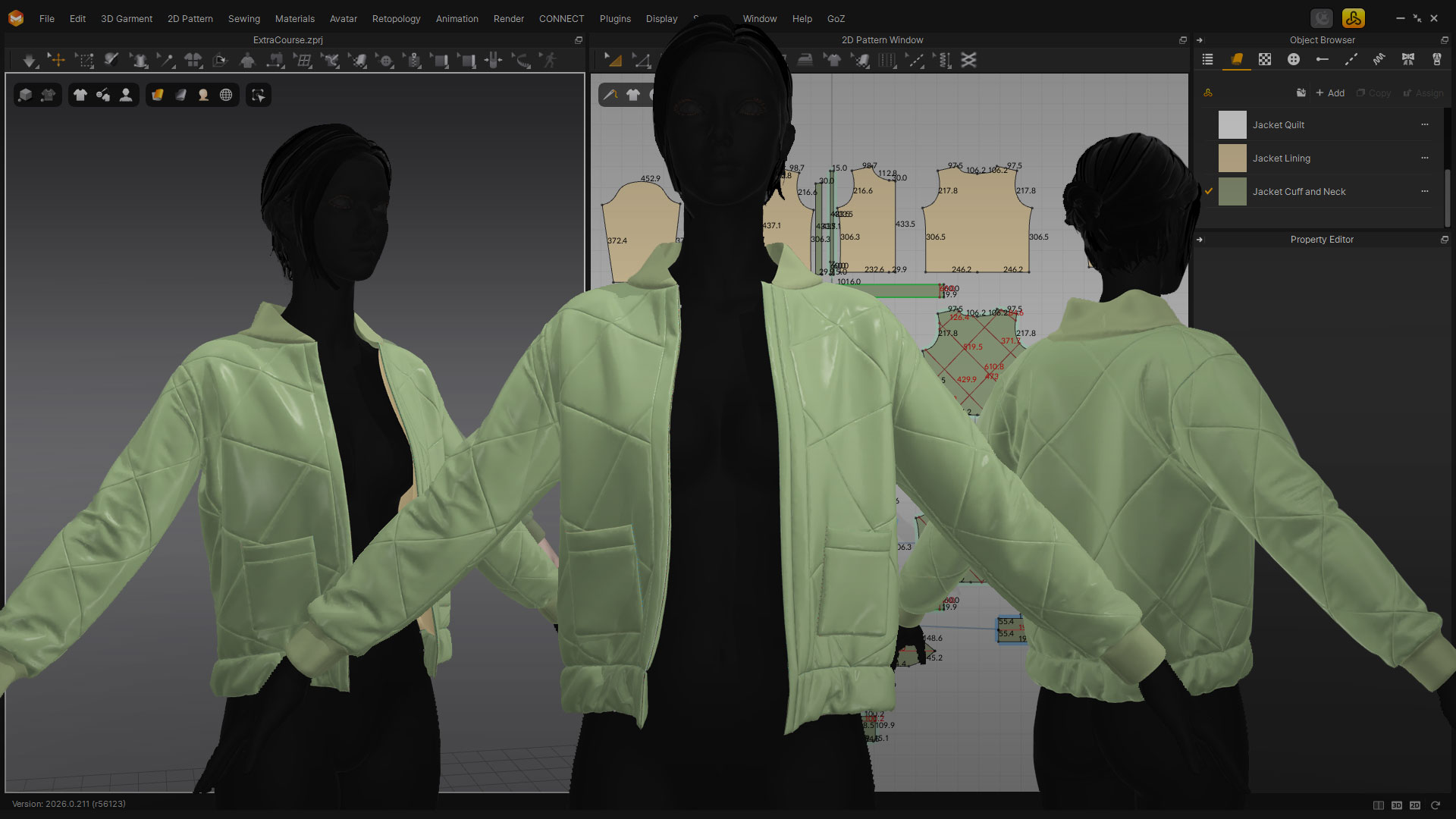
For the first demonstration, Erika starts with a T-shirt and a pair of trousers with pockets, focusing on how to sew everything together correctly. She follows up with a more challenging project: a quilted jacket with multiple layers, which is a little more complex. From there, Erika walks through two other pattern workflows that can help when a specific sewing pattern isn't available online. Last but not least, Erika walks through a more environment- and art-focused demo showing how artists can use Marvelous Designer for more than just characters.
By completing this workshop, artists will develop a solid understanding of Marvelous Designer. In this workshop, Erika provides scene files for Lessons 10, 12, 15, and 16, as well as the sewing pattern for Lesson 12 and her reference. She also provides the custom avatars for Lesson 16, along with her full-res Marvelous Designer fabric preset sheet.
17 Lessons
Artist Erika (Lochs) Macintyre begins this 5-hour workshop by covering common sewing terminology that artists might encounter when searching for patterns online. Some of the terms she discusses in this lesson will also translate into Marvelous Designer itself, since many features/terminology are based on real-life sewing terms.
Duration: 14m 10s

In this lesson, Erika reviews the overall Marvelous Designer UI and shows how to navigate the various areas. She takes a quick look at the 3D window, 2D window, Fabrics, Property Editor, and shares how to find the Library window. She also shows artists how to modify some of the working areas.
Duration: 7m 7s

In this lesson, Erika goes over how to use the avatars that come with Marvelous Designer and shows how artists can, for example, add shoes. She also covers how to import custom meshes and set up arrangement points, and ensure all the tools work correctly.
Duration: 11m 39s

In this lesson, Erika covers the tools in the 2D window. She starts by covering how to draw basic shapes, work with internal shapes, and how to adjust them further. She then covers the sewing tools and follows up with a review of the secondary tools that aren't used as often but are helpful to know.
Duration: 35m 18s

In this lesson, Erika goes over the tools in the 3D window. Many of the tools seen here are linked to the 2D window, but a few are unique, so she focuses on the ones that weren’t already reviewed in the previous lesson.
Duration: 17m 13s

In this lesson, Erika dives into some of the options available in the Property Editor. Some of the terms in the Property Editor are more complex sewing terms, and Erika explains them along the way to keep everything simple.
Duration: 14m 39s

In this lesson, Erika continues with reviewing the Property Editor, but this time focuses on Fabrics. This is an important lesson when working with Marvelous Designer because it helps artists match their references more closely. She walks artists through all the options available.
Duration: 13m 9s

In this lesson, Erika looks at how to work with animations in Marvelous Designer. She uses the animations that come with the software, and explains that artists can also use their own Alembic files. After loading in an animation, she goes over the sequence timeline and offers up some helpful production tips.
Duration: 9m 20s

In this lesson, Erika reveals some hidden features and details the options artists can use to speed up their overall workflow. She also discusses how she often works with a large Marvelous Designer scene with multiple garments to achieve the results she wants.
Duration: 9m 18s

Erika kicks off the first demonstration by sharing a website she frequently uses to find base sewing patterns. Once she has the pattern she needs, she imports it into Marvelous Designer to demonstrate how to make a basic T-shirt using the tools she discussed in the previous lessons.
Duration: 24m 7s

In Part 2, Erika moves on to demonstrate how to make some basic trousers. Again, she starts with an existing pattern and shows how to handle pockets; she details the pocket anatomy and explains how to use layers to achieve the correct results.
Duration: 26m 40s

In this lesson, Erika dials it up a notch to demonstrate how to make a quilted jacket. She shows how to sew multiple layers together to mimic a realistic quilting effect and teaches how to fold over cuffs with the fold feature for a smoother result.
Duration: 50m 29s

In this lesson, Erika shows how to prep for making a pattern in ZBrush. She starts with a very rough blockout and explains how to unwrap it so you can use the information when you import it as a mesh into Marvelous Designer.
Duration: 8m 6s

In this lesson, Erika takes the exported blockout from ZBrush and imports it into Marvelous Designer. From there, she shows how artists can use a transparent rectangle to quickly create a clean, workable pattern from the imported asset, so they have less manual cleanup to do.
Duration: 7m 13s

In this lesson, Erika shows how to use an avatar as a base for drawing patterns. She uses the Line tool to draw the shape of the pattern she wants to create, then flattens it so it shows up in the 2D window. Once this step is complete, all that is left is some cleanup work.
Duration: 19m 37s

In this lesson, Erika shows how to examine references to create a tent and explains how to create a pattern using only photos. She then shows how she uses custom avatars for environment props. Once those are in the scene, she demonstrates how to shape the basic tent panels and sew them altogether.
Duration: 12m 21s

In this final lesson, Erika shows how to level up a basic tent by adding holes for the tent poles and rolling up one side panel. While this is a slow process with a lot of pinning and simulating, it is satisfying to see everything fall nicely into place after she places some straps at the end.
Duration: 27m 14s

Primary tools
For this workshop you’ll need:


* Note that these programs and materials will not be supplied with the course.
Project Files
When you download the workshop files, you'll get access to Erika’s helpful resources, including:
- .zprj & .jpg Patterns — provided for various lessons to follow along with the workshop
- Scene Files — provided for various lessons to follow along with the workshop
- References — provided to help ground the understanding of the lessons
- Tent .obj Files — provided for various lessons to follow along with the final lessons
- Marvelous Designer 2026 Preset Sheet — Erika’s Marvelous Designer Fabric Preset sheet
Skills Covered
Who’s this Workshop for?
This beginner-level workshop is designed for artists who are completely new to Marvelous Designer. Those with no experience with the software will get the most out of this workshop, since she will take artists through the tools commonly used in production.
The demonstrations ramp up from sewing things together to adding quilting to a jacket. This workshop could also be used as a refresher on Marvelous Designer for those who want to delve deeper into fabric simulation properties.
Learning Outcomes
By completing this workshop, artists will have gained foundational knowledge of Marvelous Designer's interface, tools, and workflow for creating professional cloth simulations and character clothing.
Key skills include:
- How to understand and use basic sewing terms that you might encounter on patterns or in the software.
- How to build a good working foundation in Marvelous Designer.
- How to draft your own patterns (using either ZBrush or Marvelous Designer)
- How to sew pattern pieces together, either from premade patterns or ones you’ve drafted yourself.
- How to use your own custom meshes and how to set them up in Marvelous Designer.
- How to extend your knowledge of Marvelous Designer beyond its abilities to create character clothing.


